It was Friday, May 7th, 2021 when Colonial Pipeline became the victim of a horribly successful cyber-attack. The company discovered a ransomware attack, and operators immediately shut down the entire pipeline, thus causing a widespread gasoline shortage across the east coast. The attacks demanded a ransom of nearly $5 million in Bitcoin for the software decryption key required to restore Colonial Pipeline’s disabled computer network.
This recent event is now considered to be one of the most momentous cyber-attacks in history, as it has now opened many conversations relating to cyber security. Many people see this attack as a wake-up call for the U.S. to put more money and effort into making sure its networks are secure. (Turton)
For more information about this breach, visit here:
What is Ransomware?
So, what exactly is ransomware?
Ransomware is a type of malicious software or virus designed to block access to a computer system until a sum of money is paid (Crawley).
This danger has recently grown to a universal issue for the entire globe. Ever since the start of the COVID-19 quarantine, many individuals have entered the digital realm of the internet. You may find that technology is very convenient and essential in everyday lives, but we must understand the dangers of joining the internet.
Under here is an infographic that displays the nuclear effect of ransomware.
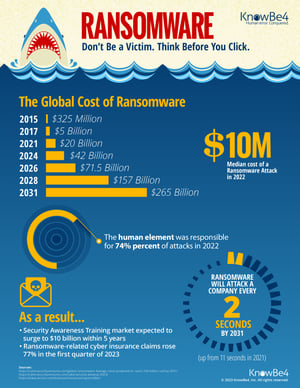 An infographic that displays the patterns of Ransomware
Ransomware can’t enter your systems unless you let them in. Confusing? Let me explain…
What is Phishing?
Phishing? Sounds like fishing. Well…you’re not far from the truth.
 Hacking ph(f)ishing for your personal data (Matthews)
“Phishing is a cybercrime in which a target or targets are contacted by email, telephone or text message by someone posing as a legitimate institution to lure individuals into providing sensitive data such as personally identifiable information, banking and credit card details, and passwords.” (“What is Phishing?”)
So in this case, the people are the fish and the fishers are the bad actors using bait to lure you to a trap.
Most malicious actors use this method to get into your devices and insert malicious software such as ransomware or spyware. This blog aims to teach you how to sway away from phishing attacks and know how to recover from an initiated attack.
Phishing is still prevalent to this day and the only way to protect against them is to understand how they operate.
Especially during the COVID-19 pandemic, phishing attacks soared to a whopping 220% increase which peaks as cybercriminal opportunism intensifies (Warburton).
And if you think your mobile devices such as iPhones or Androids are not vulnerable to these sorts of attacks, you’re wrong!
Even our mobile devices have received an increase in ransomware attacks by over 100% (Humayun, et al. 111).
Think about how you install apps on your phone. How can you trust that the developers didn’t add additional functions to monitor what you’re doing? Or even worse, steal your personal information?
7 Essential Steps to Prevent Ransomware and Phishing
Now that I’ve opened your eyes to the importance and dangers of ransomware and phishing, I’m here to teach you what you can do to prevent them.
There are many resources that provide personal applications to secure yourselves and even companies from the dangers of living on the internet.
I’ve curated a list of 7 essential steps in order to increase your security and lessen your chances of becoming a victim to ransomware/phishing attacks.
1. Require multi-factor authentication
Where the user must provide two or more pieces of evidence to verify their identity to gain access to an app or digital resource.
To secure yourself significantly more, you can use your phone, fingerprint, face ID, email, authenticator apps, or other personally identifiable information. So, even if a hacker discovers your password, there is a second wall protecting against being fully compromised. (Shelton)
2. Strengthen your passwords
Now even if you apply multi-factor authentication, you should still make your passwords stronger. That way, the hackers won’t use your weak passwords against other apps or accounts because people are known for using the same password for every account. (Stahl)
- More Information: https://www.kelsercorp.com/blog/4-ways-to-strengthen-your-passwords
3. Don’t use the same password for other accounts
Segwaying into the following essential is to avoid using the same password for other accounts. I recommend that you use a password manager (e.g. LastPass, Apple Keychain, Bitwarden, etc.) that essentially stores your passwords and can generate powerful ones for you. All you have to do is remember one strong master password that provides access to a database of all your other passwords. (“The Risks of Using the Same Password for Different Accounts.”)
- More Information: https://password-managers.bestreviews.net/the-risks-of-using-the-same-password-for-different-accounts/
4. Use anti-virus
The anti-virus’ job is to identify and mitigate malicious software in your devices. But keep in mind, this is only to protect you if the malicious software is ALREADY in your systems. So this is the second level of defense if you end up victim to one. (Alameda)
- More Information: https://www.bbva.com/en/antivirus-software-guide-what-are-they-for-and-how-to-use-them/
5. Update software
You want to update anything such as OS, apps, anti-virus, and firmware. As time passes, people discover new vulnerabilities and exploits used to take advantage of your systems. So keeping your systems updated can mitigate the risks of recently emerging vulnerabilities. (Symanovich)
- More Information: https://us.norton.com/internetsecurity-how-to-the-importance-of-general-software-updates-and-patches.html
6. Backup your data
Backing up your data is basically storing a copy of all your data into another storage space. So if the ransomware system accesses your files and encrypts them, you have another copy in hand to save you! You can also use cloud services like OneDrive or Google Drive to back them up in a very secure location. (Griffith)
- More Information: https://www.pcmag.com/news/the-beginners-guide-to-pc-backup
7. Learn to identify phishing/spam
Understanding the standard structure of phishing attempts is essential. Knowing how the malicious actor thinks and acts will make it easier to identify and stop the threat from pursuing their goals. Then you can pat yourself on the back for succeeding in doing so! (“How to Spot Phishing Emails: 7 Helpful Tips for Employees”)
- More Information: https://cofense.com/knowledge-center/how-to-spot-phishing/
In conclusion, cyberattacks should be a call to every industry to see the importance of cybersecurity to avoid any significant casualties in the future. As the digital landscape evolves, the security infrastructure should follow it. Enforcing education in security throughout all professions is also an essential procedure in mitigating any further threats. Cyber threats are experiencing an ever-growing appearance, especially in the digital age as we undergo social distancing, so it is crucial to put security in all our minds as we progress in the cyber industry.
Works Cited
- Alameda, Teresa. “Antivirus Software Guide: What Are They for and How to Use Them.” NEWS BBVA, BBVA, 25 Nov. 2019, https://www.bbva.com/en/antivirus-software-guide-what-are-they-for-and-how-to-use-them/.
- Crawley, Kim. “All about Ransomware Protection.” Hack The Box, https://www.hackthebox.eu/blog/all-about-ransomware-protection.
- Griffith, Eric. The Beginner’s Guide to PC Backup. PCMag, 31 Mar. 2021, https://www.pcmag.com/news/the-beginners-guide-to-pc-backup.
- “How to Spot Phishing Emails: 7 Helpful Tips for Employees”. Cofense, 22 Apr. 2021, https://cofense.com/knowledge-center/how-to-spot-phishing/.
- Humayun, Mamoona, et al. “Internet of Things and Ransomware: Evolution, Mitigation, and Prevention.” Egyptian Informatics Journal, vol. 22, no. 1, Mar. 2021, pp. 105–17. ScienceDirect, https://doi.org/10.1016/j.eij.2020.05.003.
- Matthews, Kayla. “6 Sure Signs Someone Is Phishing You-besides Email”, Malwarebytes Labs, 29 Jan. 2020, https://blog.malwarebytes.com/101/2018/09/6-sure-signs-someone-is-phishing-you-besides-email/.
- “Ransomware.” What Is Ransomware?, KnowBe4, 2021, https://www.knowbe4.com/ransomware.
- Shelton, Martin. “Two-Factor Authentication for Beginners.” Medium, 24 June 2021, https://mshelton.medium.com/two-factor-authentication-for-beginners-b29b0eec07d7.
- Stahl, Adam. 4 Simple Ways to Strengthen Your Passwords, Kelser, 2 May 2019, https://www.kelsercorp.com/blog/4-ways-to-strengthen-your-passwords.
- Symanovich, Steve. 5 Reasons Why General Software Updates and Patches Are Important, Norton, https://us.norton.com/internetsecurity-how-to-the-importance-of-general-software-updates-and-patches.html.
- “The Risks of Using the Same Password for Different Accounts.” Password Managers Reviews, 20 Jan. 2018, https://password-managers.bestreviews.net/the-risks-of-using-the-same-password-for-different-accounts/.
- Turton, William, and Kartikay Mehrotra. “Hackers Breached Colonial Pipeline Using Compromised Password.” Bloomberg.com, Bloomberg, 4 June 2021, https://www.bloomberg.com/news/articles/2021-06-04/hackers-breached-colonial-pipeline-using-compromised-password.
- “What Is Phishing?” Phishing | What Is Phishing?, KnowBe4, https://www.phishing.org/what-is-phishing.
- Warburton, David. “Phishing Attacks Soar 220% During COVID-19 Peak as Cybercriminal Opportunism Intensifies.” F5 Feature Article, 2020, https://www.f5.com/company/news/features/phishing-attacks-soar-220--during-covid-19-peak-as-cybercriminal.