Links are truly confusing to understand. You would see a jumble of characters that seem absurd to you. But if we take a closer look at them, you will soon understand the basic structure of a URL.
Here is a simple example:
https://medium.com/p/1f2eb118e422/edit
- The https:// is showing which protocol the server is using to interact with the web browser.
- The medium.com is the domain name of the website. This is a unique reference that identifies a website on the internet.
- The /p/1f2eb118e422/edit is the path of the website. This would refer to the file or directory that lives within the website server.
Here is a more complex example:
https://video.google.co.uk:80/videoplay?docid=-7246927612831078230&hl-en#00h02m30s
Don’t be intimidated by this link! It might look hard to decipher, but once you understand the little bits of information that defines the parts of a link, it will be very easy to understand.
It’s really important to understand the structure of a URL so you know where you are and what type of link you are clicking on.
- The video is the subdomain of the link. It is an addition to the main domain to help you navigate through the website with ease.
- The :80 (TCP) is the port number you of the website. Typically they aren’t shown in the URL because they give a default port for the protocol used in the URL. E.g. https -> Port 443
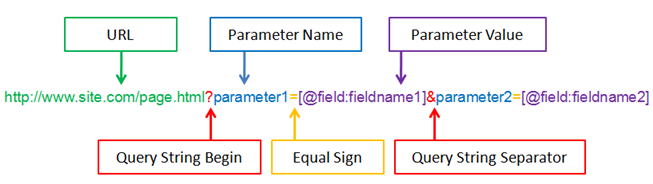
- The ? is the start of a query. You typically see this in URLs of dynamic pages (pages that are generated from a database or user-generated content) They have one or more parameters that are used to help specify which content or actions based on the data that is being passed.
- The docid=-7246927612831078230&hl-en is the parameter of the website. When there is more than one, the URL separates each parameter with a “&” to individualize each parameter.
- The #00h02m30s is the fragment of the website. It usually appears at the end of a URL and begins with a hash (#) character followed by an identifier. It refers to a section within a web page.
These are simple examples of the structure of a URL and there will be a part 2 getting more in-depth within the likes of a URL. There are many sources in which you can adventure to find out more about them and I recommend that you check out these resources :)
Sources: